CSC Import Add to Notes option bug with duplicated text
When importing contacts from a CSV file and selecting the Add to Notes option for one of the fields, the system adds the text from the first line in the file to all contacts in the CSV file.
I have the same <notes text> added to all of my contacts.
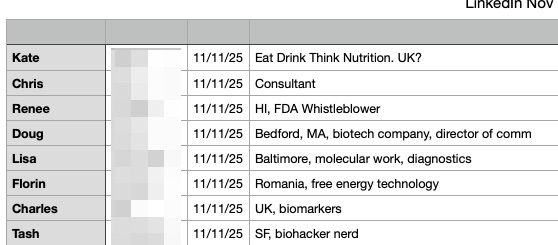
In the table below, Kate’s 4th note field “Eat Drink Think Nutrition” has been duplicated into Chris through Tash in this 8 person import.
All 8 contacts have the same note field.
Comments4
Andrea
Nov 24, 2025
looking into this right away David! in the meantime let us know if you need help to fix those imported contacts
User
Nov 24, 2025
It has something to do with no column headings. It has an easy workaround to add the column headings, so fix is not essential. It was only a few contacts as a test import, so no worries on the imported contacts.
David
Nov 24, 2025
Workaround available. Thank you.
David
Nov 24, 2025
Update: I imported these contacts again. This time with column headers in the CSV file and the import worked fine re: Notes added (it merged withe existing contacts). I will include headers in all CSVs from now on; even though I can select columns on import.