Broken SAGA Link in Team Events
Hi team!
I added an event to my calendar via the Google Calendar Integration by clicking the little calendar icon next to an event in our team calendar.
I am noticing that it includes the actual Zoom link in the notes / description field, but the link showing in the location is to the general SAGA app (not even our domain branded one).
For example:
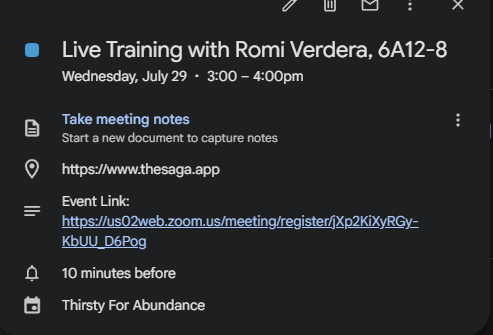
So if someone clicks on the location, they are taken to the normal Frazier-version of SAGA and it requests they sign in (which then creates an account not within our domain - I wonder if this is how some of our users ended up under the non-domained SAGA in the past).
Would it be possible to either have that SAGA link taken out of there entirely, or put a note in the description that the event was added via SAGA but not have the primary location of the event be listed as SAGA? Possibly move the actual event location (the zoom link) into location field?
Thanks!
Comments4
SAGA
Sep 2
Hi Mckenna, we have now moved the link into the location and we have update the link to SAGA to redirect you to the dashboard so people will land directly in the correct tenant if they click on it
McKenna
Sep 2
Amazing, TY!
SAGA
Aug 19
Hi McKenna, we will move the link into the location.
About the tenant misplacement, the add to calendar function is only for internal user and if you wants to share the event with external user you should use the share button on the calendar event itself. This will give you a shareable link.
SAGA
Aug 16
looking into this! and sorry for the late